
The All-in-One Online Deposition Platform
eSuite is LiveLitigation's remote deposition software. Take or defend a deposition from anywhere, with HD video, your court reporter's realtime transcript, and electronic exhibits in one secure room, for depositions, hearings, trials, and arbitrations.
- Attorneys, witnesses and guests join right in their browser
- Every participant in the right role, with safeguards around the witness
- Recordings that keep the exhibits beside the testimony
- Bring your own court reporter, or any agency
Browser-based
Branded interface
Encrypted delivery
24/7 support
What is an online deposition platform?
An online deposition platform lets attorneys, witnesses, and court reporters run a deposition remotely over the internet instead of gathering in one room. Rather than juggling a separate video call, realtime transcript feed, and exhibit share, everything happens in a single secure interface.
eSuite is LiveLitigation's online deposition platform. It brings video conferencing, the court reporter's realtime transcript, and electronic exhibits together so a full remote or hybrid deposition, hearing, or arbitration runs from one place, and attendees join right in their browser.
Online deposition platform features
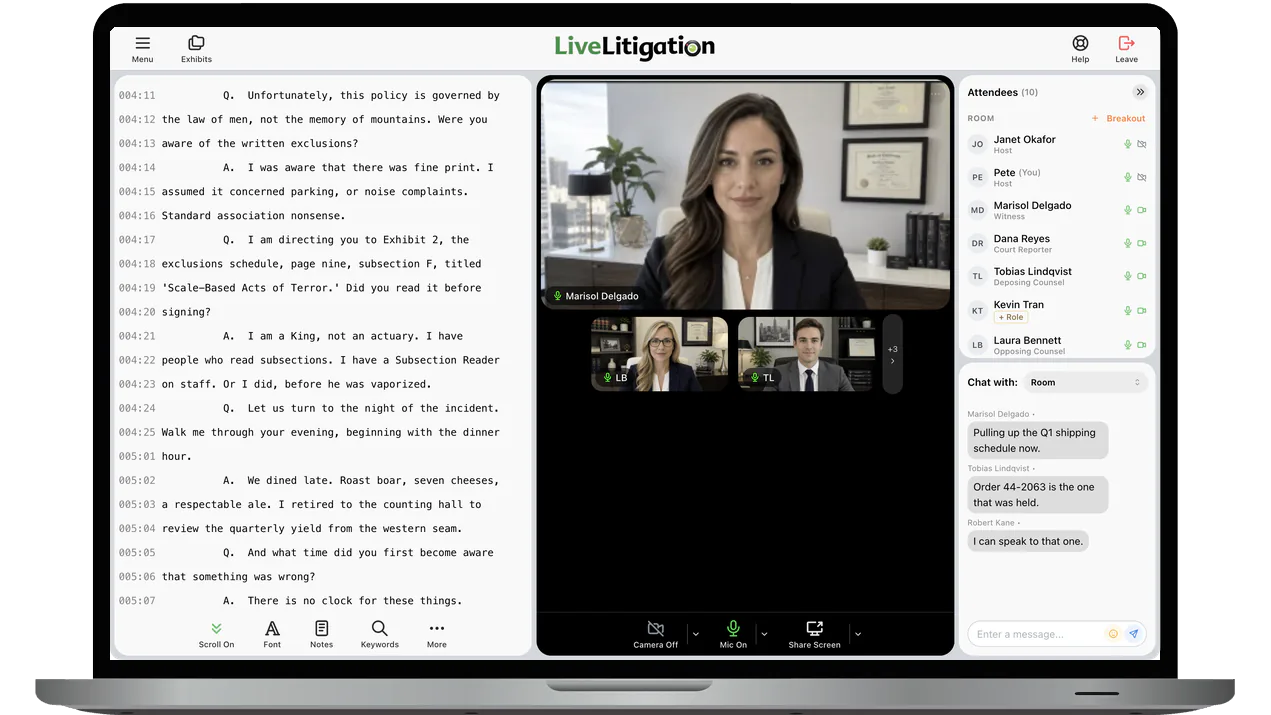
Video, the reporter's realtime transcript, exhibits and private team chat, together in one window.
Every participant in the right role
Mark each invitee as Witness, Deposing Counsel, Opposing Counsel, Court Reporter, Videographer or Observer, and add co-hosts. The roles do real work: the witness cannot share their screen, and deposing counsel cannot privately message the witness or invite them to a breakout room.
- Teams for each side, with team chat and exhibits shared only with your team
- Message your own team or one person privately. Messages are not stored after the session.
- Breakout rooms for private conferences
- Invited attendees confirm who they are with a one-time code sent to their email
- Lock the room, and the phone bridge with it, once everyone is in
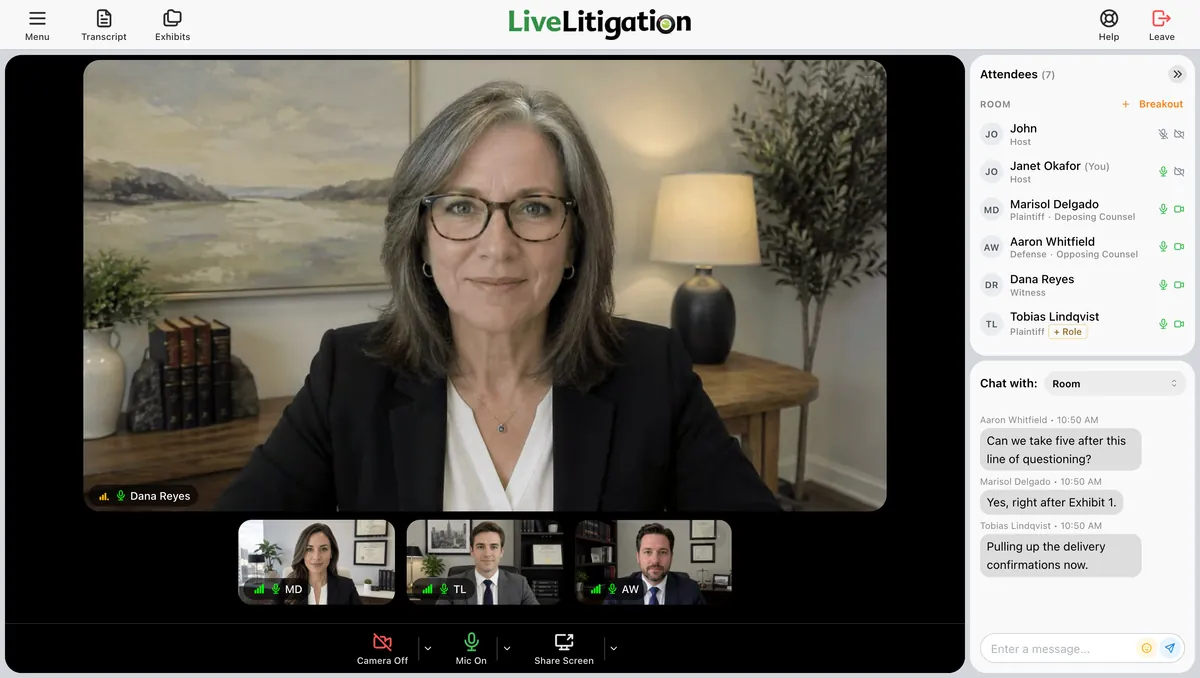
Want to see a deposition room in action? Book a demo, or call (888) 337-6411.
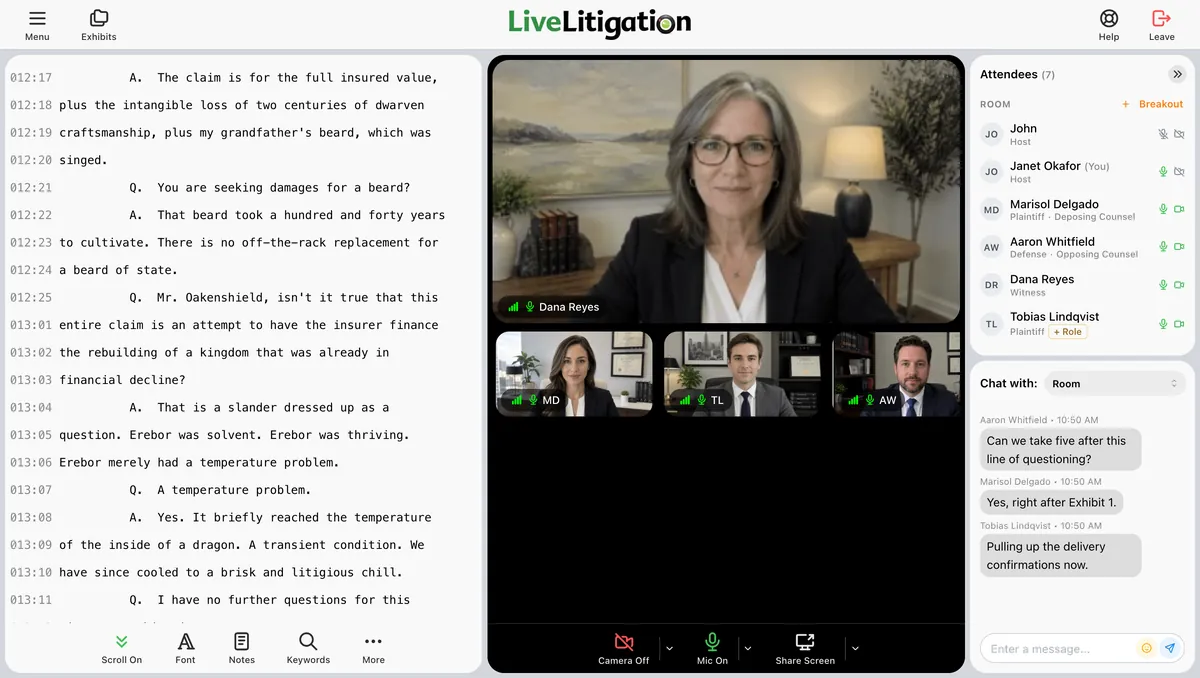
Your court reporter's realtime, beside the video
Attorneys follow the realtime transcript as the reporter writes it, right next to the witness. Bring your own court reporter, or any agency.
- Search the transcript, and jump to any word with the keyword index
- Highlight in six colors and add notes
- Color-code questions and answers
- Save a page:line PDF with your highlights and notes
Exhibits, presented and stamped live
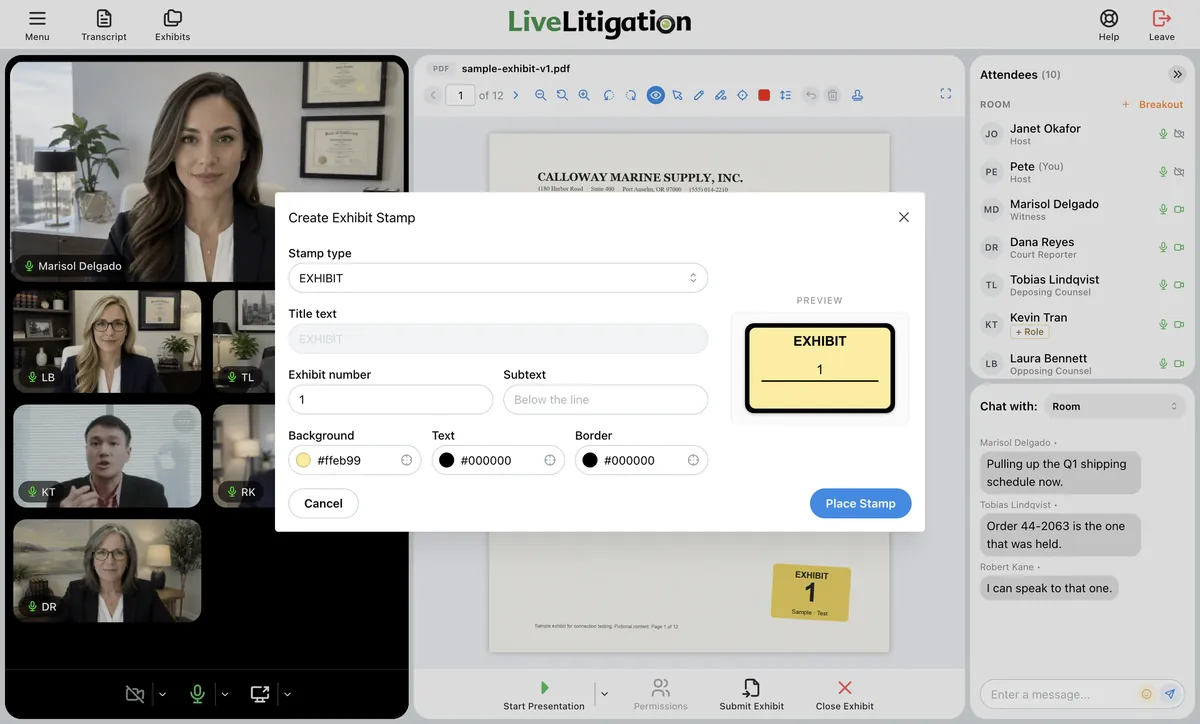
Upload exhibits before the deposition or during it, and present them so everyone sees the same page. The presenter leads, and can let the witness or co-counsel mark up too. Everyone sees every mark as it is drawn.
- Draw, highlight, and zoom everyone to the line that matters
- Stamp it Exhibit, Plaintiff's, Defendant's or your own header, with the next exhibit number filled in and a line of your own text
- Submitted PDFs and images keep every stamp and mark in a new copy. The original is never changed.
- Keep your exhibits in folders, and reuse them in every deposition with My Files
- Works with PDFs, images, Word, Excel, PowerPoint, video and audio
A record you can use
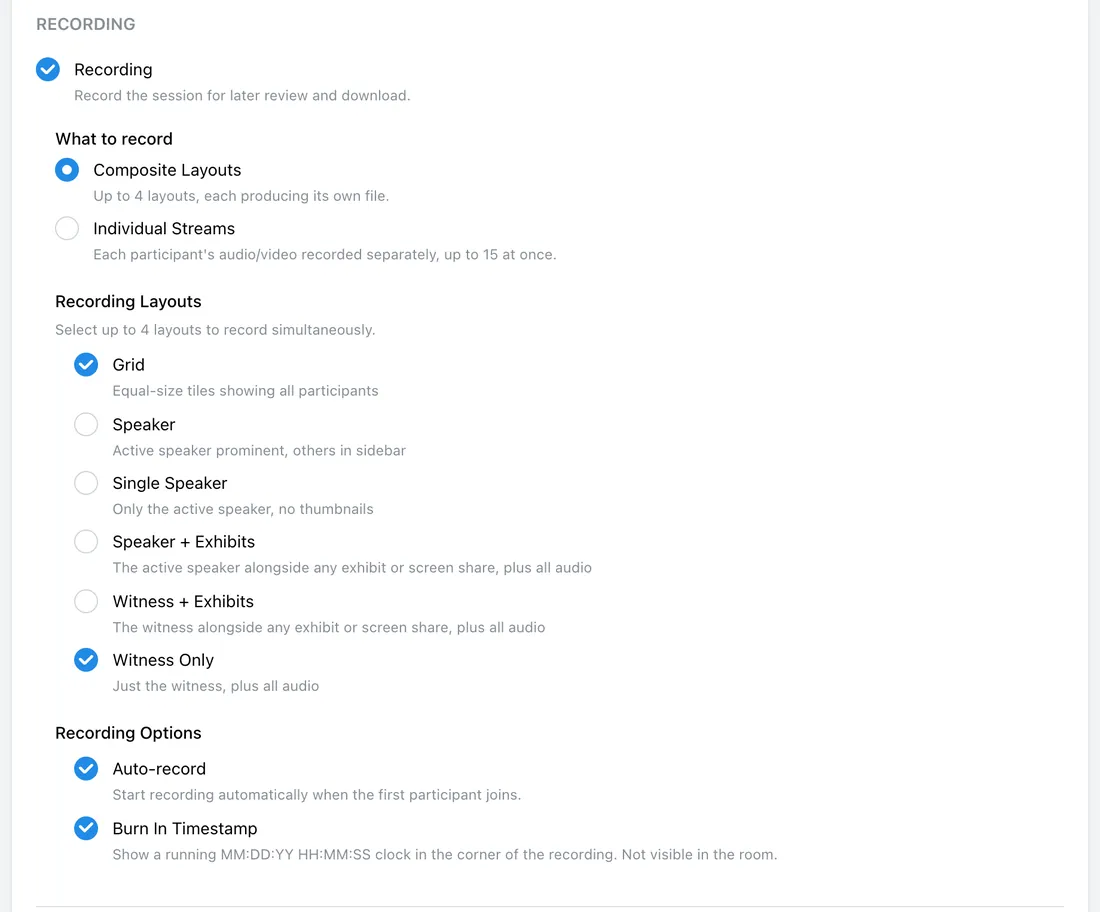
Record the whole proceeding automatically, with layouts built for depositions.
- Witness Only, Witness + Exhibits and Speaker + Exhibits layouts keep the exhibit on the record beside the testimony
- Record each participant as a separate stream, with a burn-in timestamp
- Invite a videographer to a clean, distraction-free view of the witness and exhibits
- After the session, generate an AI summary of the transcript in one click and download it as a PDF
- Attendance reports for every room, as CSV or PDF
Before the session, load exhibits into My Files. Afterwards, find exhibits, recordings and transcripts in your dashboard.
For court reporting agencies
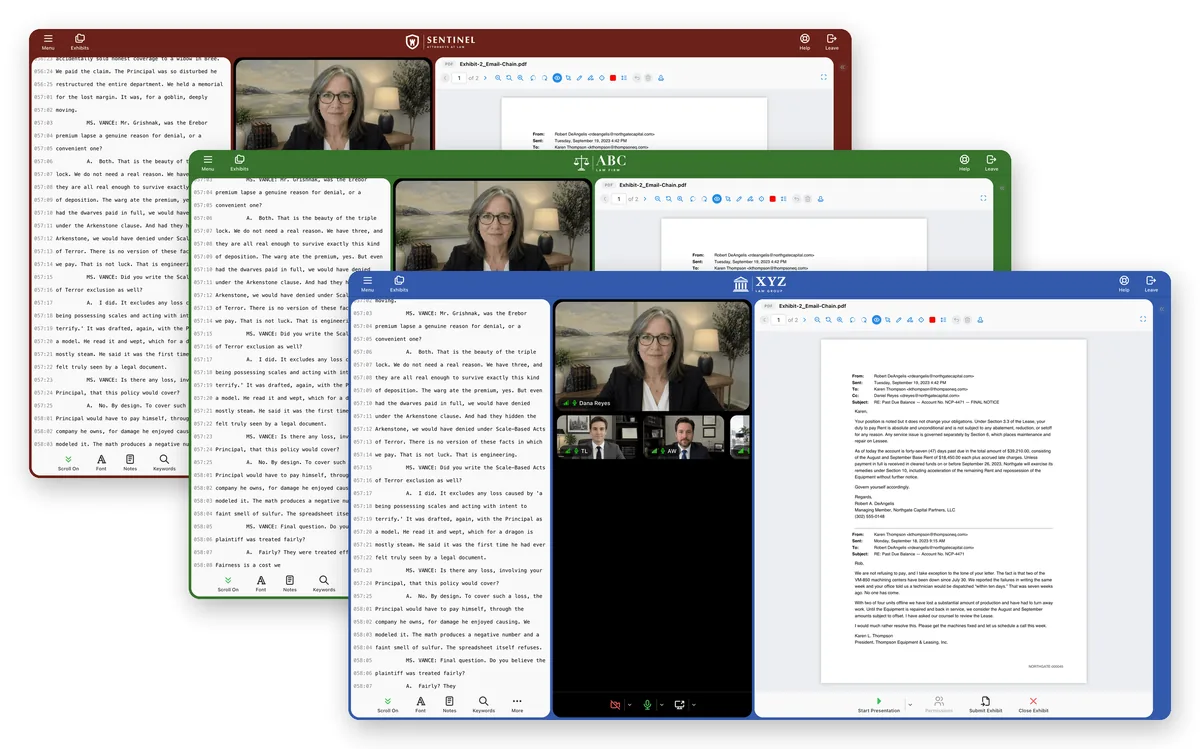
Host depositions for your law firm clients under your own brand.
- Your logo and colors on every room and email, with your own domain available on request
- Give each scheduler their own sign-in with Account Users
- Save room templates for the setups you use every week
- Connect your own systems with the REST API
What litigators and agencies say
It is so helpful that we can use LiveLitigation for witness prep in advance of our deposition.
Pia K.
Willkie Farr & Gallagher LLP
It's nice to finally feel comfortable with taking depositions remotely. The live support tech is very assuring.
John L.
Manatt
The solution solves so many of the problems we encountered with another vendor's solution.
Jessie P.
Kirkland & Ellis
Ease of operation and cost savings are why we chose LiveLitigation. Attorneys can remain in their office while conducting video depositions at remote locations anywhere with a high-speed connection.
Thomas Olender
Owner, Olender Reporting
Also included
PC & Mac
Join from recent Chrome, Edge, Firefox or Safari.
Phones & Tablets
Attend from Safari on iPhone and iPad or Chrome on Android.
HD Video
HD video from any standard webcam, to examine the witness face to face.
Screen Sharing
Share an entire screen or a single application.
Audio Your Way
Audio in the browser, or phone dial-in through a built-in teleconference bridge.
Encrypted Delivery
The app, audio and video are encrypted in transit.
Simple Scheduling
Send calendar, email or SMS invitations with the room link, date and time.
Clio Integration
Add attendees from your Clio contacts and send submitted exhibits to the matter.
24/7 Event Support
Free training, testing, and live assistance to ensure smooth proceedings.
Available add-ons: Speech-to-Text transcripts when there is no court reporter, and Replay share links with transcript search and video clips.
Online deposition platform FAQs
What is an online deposition platform?
An online deposition platform lets attorneys, witnesses, and court reporters conduct a deposition remotely over the internet. LiveLitigation's eSuite combines video conferencing, the court reporter's realtime transcript, and electronic exhibits in a single web-based interface, so a full remote or hybrid deposition runs from one place.
Do I need to download software for a remote deposition?
No. Attorneys, witnesses and guests join right in their browser on a computer, iPhone, iPad or Android device.
Can I use my own court reporter?
Yes. Bring your own court reporter, or any agency.
Can I share and mark exhibits during a remote deposition?
Yes. Electronic exhibits are built in. Upload them before or during the deposition and present them so everyone sees the same page. The presenter leads, and can let the witness or co-counsel mark up too. Then stamp the exhibit and submit it for the record.
Is the platform secure enough for confidential testimony?
Yes. The app, audio and video are encrypted in transit, and invited attendees confirm who they are with a one-time code sent to their email. Teams can message their own side or one person privately, and messages are not stored after the session.
Can a court reporting agency use its own branding?
Yes. Your logo and colors appear on every room and email, with your own domain available on request.
Learn more
Get More Information
To get started with an eSuite account or to schedule a demo, fill out the form below or call (888) 337-6411.