
Realtime Court Reporting & Deposition Streaming
The fastest, most reliable way to deliver interactive real time deposition streaming and online deposition transcripts to multiple attorneys.
- Native apps for Windows, macOS, iOS, and Android
- Local (offline) delivery with an included pre-configured wireless router
- Remote (online) delivery with encrypted transport when internet is available
- Highlights, search, notes, and export for efficient review
Interactive transcript
Local & online
Encrypted delivery
24/7 support
What is realtime court reporting?
Realtime court reporting streams the stenographer's transcript to attorneys as the words are spoken, so counsel can read testimony live during a deposition, hearing, or trial instead of waiting for a rough draft. With LiveLitigation, that interactive realtime feed reaches multiple attorneys at once, in the same room or remotely, with search, highlights, and notes built in.
You can deliver realtime two ways: locally over a private wireless network with no internet required, or online with encrypted transport for remote and hybrid proceedings. Native apps for Windows, macOS, iOS, and Android keep latency low and the connection stable, so the realtime transcript stays reliable even when venue Wi-Fi is not.
Who it’s for
Court reporting companies and freelance real time reporters who need fast, reliable transcript delivery for online depositions and remote arbitration hearings.
Why choose our realtime reporting service
What keeps the feed dependable, whatever the venue gives you to work with.
How realtime court reporting works
Three ways to deliver: in the room, online, or both at once. Here’s what each one needs.
Local (Offline)
Stream transcript to attendees over a private local network -no internet required. A pre-configured wireless router is included with your subscription.

Internet
Not needed
Router
Included
Attendees
In the room
Remote (Online)
Deliver securely over the internet for remote and hybrid proceedings. Use the native apps or a modern browser - your choice.

Internet
Required: venue Wi-Fi or your hotspot
Router
Not needed
Attendees
Anywhere
Local and Remote at the same time
Run both in the same session. Attendees in the room connect through the included router, and remote attendees join online over the location’s internet or your hotspot.

Internet
Needed for remote attendees
Router
Included, for the room
Attendees
In the room and anywhere
You can also start in Local mode and switch to Online later (or vice-versa) without changing the workflow for attendees.
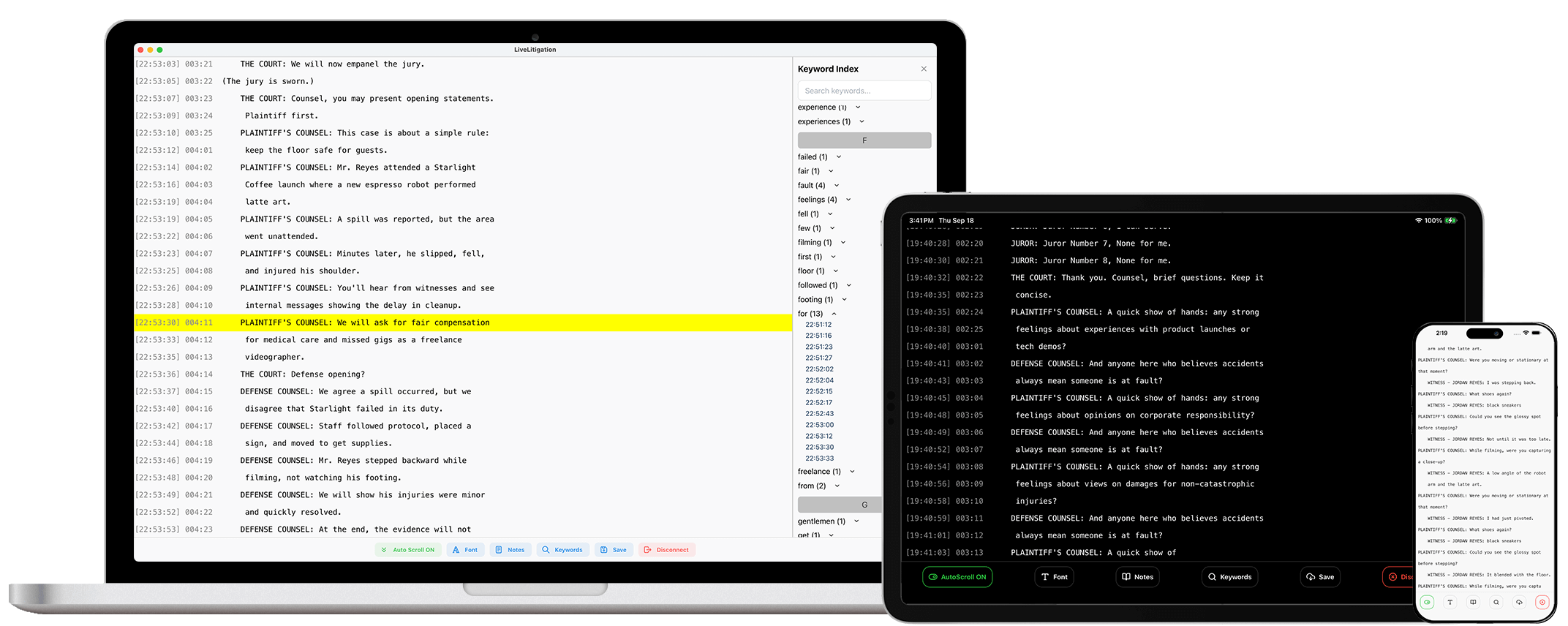
Key realtime reporting features
Everything you need to deliver a clean, dependable realtime experience.
Interactive transcript
Smooth scrolling, timestamped lines, and a modern reading view for attendees.
Keyword search
Instant filtering so counsel can jump to critical moments.
Highlights & notes
Mark key lines and add notes that export with context.
Export & sharing
Export to common formats for downstream tools and team review.
Secure delivery
Encrypted transport; attendee access is controlled by the host.
Native performance (Win/macOS/iOS/Android)
Lower latency and pro-grade stability with platform-optimized apps.
Router included for Local mode
We ship a pre-configured wireless router with your subscription; just plug in and go.
Great on every device
Desktop, laptop, and mobile devices - attendees get a polished experience everywhere.
24/7 support
LiveLitigation technicians available for training, testing, and live help.
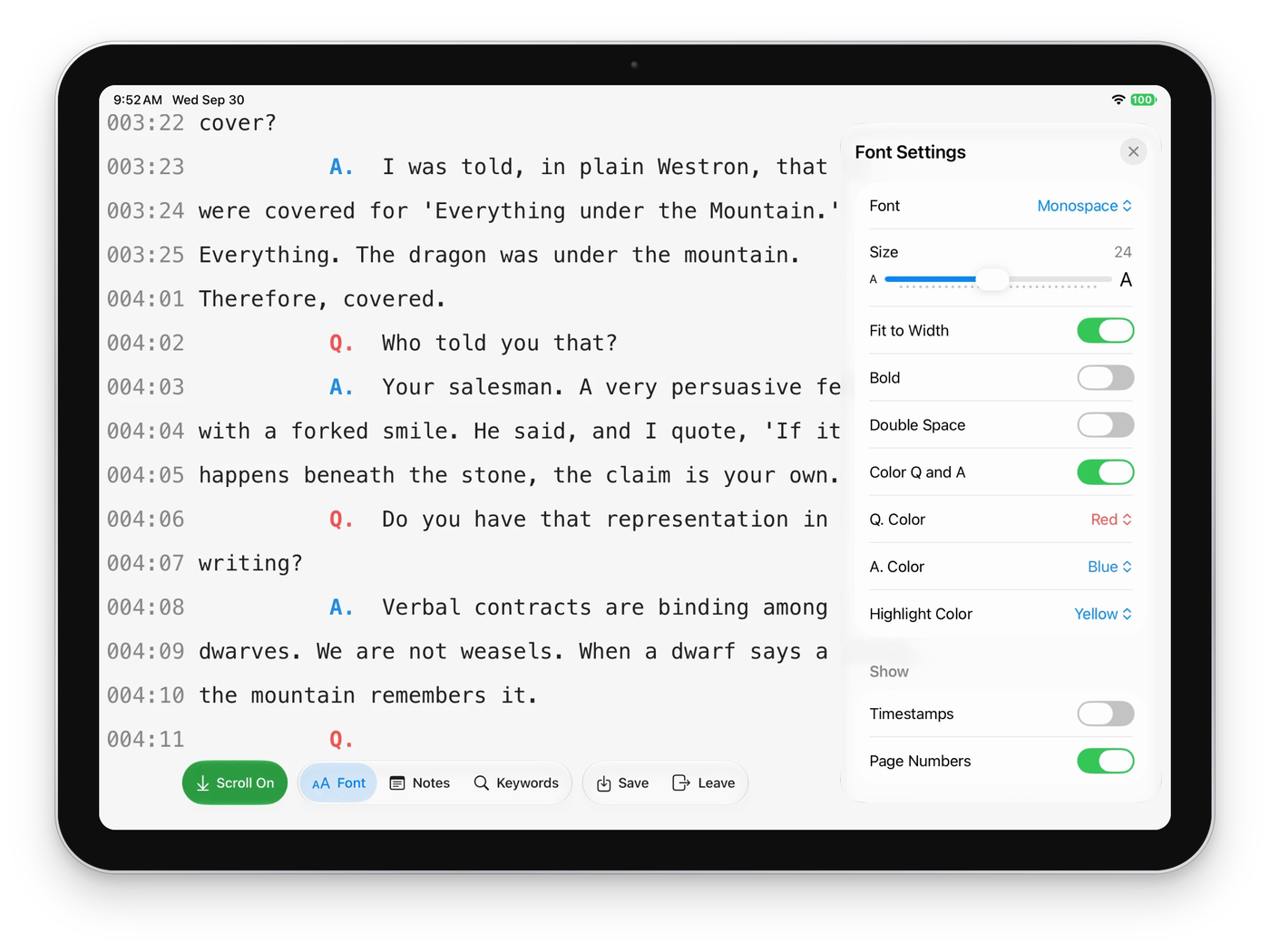
Read the transcript your way
Every attendee sets up the transcript the way they read best, on a laptop, a tablet or a phone, and that device remembers it for next time.
Realtime vs. eSuite
Realtime focuses on transcript delivery with native apps and offline capability; eSuite adds video/audio, exhibits, chat, and breakouts for law firms and agencies.
| Capability | Realtime | eSuite |
|---|---|---|
| Interactive transcript | Yes (native + web) | Yes (web) |
| Local (offline) delivery | Yes - router included | - |
| Online delivery | Yes | Yes |
| Video & audio conferencing | - | Yes |
| Electronic exhibits | - | Yes |
| Private team chat | - | Yes |
| Breakout rooms | - | Yes |
Technical requirements
Reporter workstation
Attendee devices
FAQs
Can I run realtime court reporting without internet?
Yes. Use Local (Offline) mode with the included wireless router to deliver the transcript to attendees over a private network, with no internet required.
Do attendees need to install anything to view the realtime transcript?
No. Attendees can use our iOS and Android apps or join from any modern browser. Both provide interactive search and highlights, and no account is required to view.
Does Realtime include video and exhibits?
Realtime focuses on interactive transcript delivery. If you also need video, exhibits, chat, and breakout rooms, our eSuite platform adds those for depositions, hearings, and trials.
Is support available during depositions and hearings?
Yes. LiveLitigation provides 24/7 support from our technicians for training, testing, and live events.
Ready to deliver modern realtime?
Purchase online or request a guided demo from our team.